

Features
Everything a marina or storage yard does in a day.
Stow covers the docks, the yard, the customers, the shop and the books. Use the parts you need. The rest stays out of your way.
Storage
What’s where, what’s moving this week and who has signed for the season.
- Map
- Your marina or yard drawn as it really is. Every slip and space shows what’s in it, what’s arriving and what’s out on a trip.
- Arrival check
- As a unit is parked, Stow offers to take photos of it. One tap to skip if it’s pouring.
- Movements
- Book a season’s worth of drop-offs and pickups as a list you can work down.
- Yard diary
- The same movements as a calendar, with a printable pull list for the morning.
- Agreements
- Moorage and storage agreements filled in from the customer’s record and signed on their phone.
- Renewals
- See every agreement ending this season and renew them one by one or all at once.
- Storage planner
- A month view that answers the question the phone keeps asking: is there room?
- All spaces
- Every space as a list, sorted by building, with what’s in it and since when.
Customers
One page per customer with their units, their paperwork and their history.
- Contacts
- Names, numbers and addresses with every unit, agreement, invoice and job they’ve ever had.
- Units
- Boats, RVs and trailers with sizes you can sort by and the equipment that came with them.
- Messages
- Past texts and emails with a customer kept on their record, so nobody has to ask twice.
- What needs doing
- The top of each record says what to do next, like renewing an agreement or chasing a balance.
- Possible duplicates
- Flags the same person entered twice, so you can tidy it up before it causes a billing mix-up.
- Tags
- Mark customers however you think about them and filter by it.
Service
From the phone call to the invoice, with the shop’s week on one screen.
- Service board
- Booked, staging, in the shop, waiting for parts and ready for pickup. Every open job, at a glance.
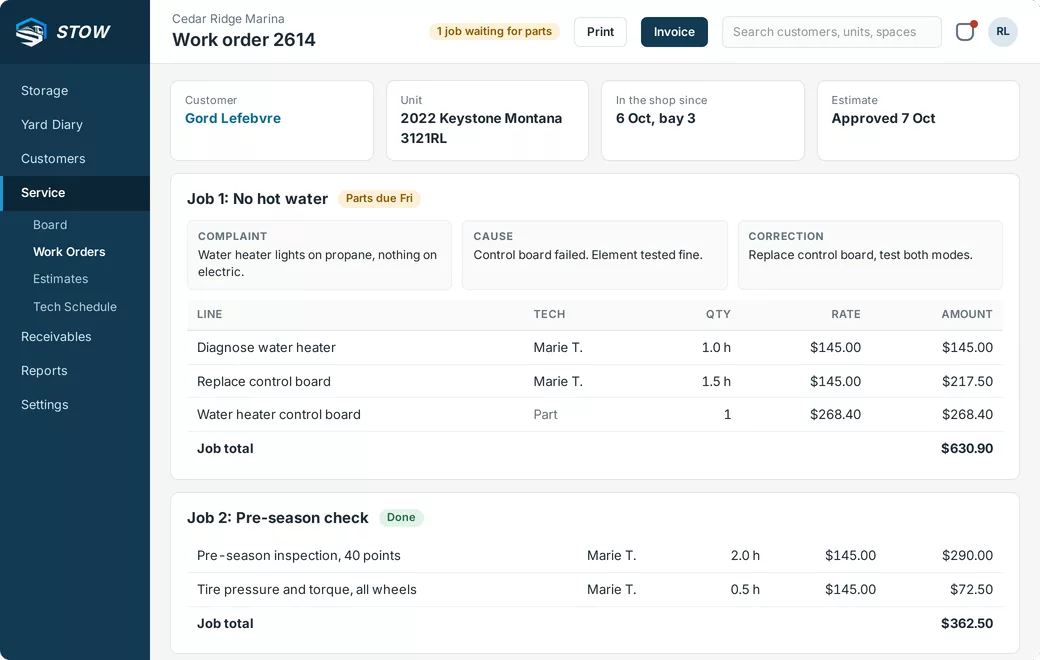
- Work orders
- Complaint, cause and correction on every job, with labour and parts lines underneath.
- Estimates
- Quotes waiting for the customer’s go-ahead, kept in one list until they’re approved or lapse.
- Tech schedule
- Each technician’s week. Drag jobs between days and book in half hours.
- Service calendar
- Drop-off days on a calendar so the shop knows what’s coming through the gate.
- Time clock
- Clock on for the day and book time to jobs. The gap between the two is the number worth watching.
- Job templates
- Winterizing, shrink wrap, annual service. Set up once, add to a work order in a click.
- Parts
- The parts used on each job, carried through to the invoice.
Money
What’s charged, what’s paid and what’s owed, tied back to where it came from.
- Invoices
- Every invoice points at the agreement or work order it came from.
- Statements
- What each customer owes, ready to print.
- Monthly billing
- Monthly storage charges run in one pass instead of one customer at a time.
- Rates
- Seasonal, monthly, time based and labour rates, each labelled with what it’s for.
- Point of sale
- Counter sales and daily takings in the same books as everything else.
- Accounting
- GL codes, surcharges and a lock date for closing the books on a month.
Reports
Twenty-odd reports that answer what owners actually ask, checked against the invoices underneath.
- Revenue and profit by month
- Charged and collected each month, and profit against the same month last year.
- Unpaid invoices by age
- Who owes what, and for how long.
- Occupancy by area
- How full each building and row is, and how much indoor footage is left.
- Boat side vs RV side
- Which half of the business earns what.
- Unbilled service jobs
- Work that’s finished but hasn’t been invoiced. Usually worth a look.
- Export to CSV
- Any report out to a spreadsheet when your accountant asks.
Running the place
Who can see what, and a record of who changed what.
- Permissions per person
- Fine enough to mean something. A yard hand doesn’t see money and a tech doesn’t see the paperwork.
- Change log
- Every change with who made it and when, written so a person can read it.
- Logins
- Who can sign in, and when they last did.
- Site setup
- Your business name, address and terms, used on every agreement and report.
- Message templates
- The words you use every time, written once.
Easier to see than to read about.
We’ll walk you through it on a demo yard and answer the awkward questions about your setup.